
Pinned: Expect some jankiness
Some of the JavaScript games need ... adjustments. Play at your own risk.
Recently, I decided that I needed to update my Android app so that it uses Jetpack Compose. The original version of the Latin Reader app for Android uses views inflated from an XML resource. This was comfortable to me, coming from a XAML and C# background. When I started working on the Latin Reader, I accepted that building a UI in XML was just normal.
These new “composables,” using declarative Kotlin expressions, I wasn’t so sure about. I mean, how was I going to preview the UI without an XML surface? Would I be able to specify fine details to the styling of my UI components? Wouldn’t it become cumbersome to update my UI from declarative Kotlin statements?
I shouldn’t have worried. Getting started with composables–even when I need to mix them in with views–was so easy. In fact, I rebuilt the library fragment of my app to use a prettier image-on-card item layout, all in composables.
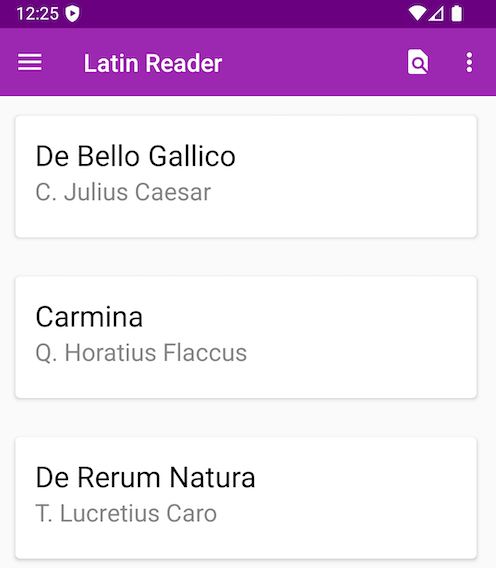
Ever since v1.0.0 of the Latin Reader for Android, I’ve felt that the UI for my “library” fragment–the fragment that shows a list of works available to read in my app–is a bit dumpy. It has a “I didn’t use any themes or styling besides what came out-of-the-box in Android Studio” kinda vibe. (Not surprising, since I essentially used the default styles, with some changes to font and primary colors.)
Furthermore, I wanted to jazz up the RecyclerView list items used in the app
a bit more. The items feel like they need more visual appeal. When I look at
the reading apps that I use personally, I noticed that most of them have the
book covers and more details about the book. Most reading apps also use a
simple card container for the book.
I personally like the look & feel of cards as a UI element, so I’ll keep using cards as containers for the list items. Of course, I don’t have to switch to composables simply to make a change to the card design in my app. However, since I’ll already be cutting over to composables in the app, this is a fine time to update the design of my reading list UI.
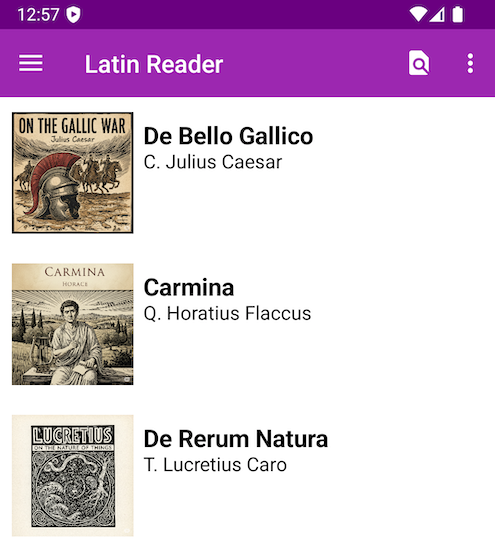
After a handful of hours, learning Jetpack Compose and
experimenting with LazyGrid and LazyColumn, I created a much more
visually appealing look & feel for my app.
This small change required significantly less work than I’d feared. In fact,
the composable code for this “lazy list” that replaces my RecyclerView had
only a few lines of code.
@Composable
fun PrettyRow(
    workInfo: WorkInfo,
    modifier: Modifier = Modifier,
    isTranslation: Boolean = false,
    onClick: (WorkInfo) -> Unit = {}
) {
    Card(
        modifier = modifier.fillMaxWidth()
            .padding(4.dp)
            .clickable { onClick(workInfo) },
        colors = CardDefaults.cardColors(
            containerColor = Color.Transparent,
        ),
    ) {
        Row(
            modifier = Modifier.padding(8.dp)
        ) {

            Box {
                Image(
                    modifier = Modifier.requiredSize(width = 100.dp, height = 100.dp),
                    painter = painterResource(workInfo.image),
                    contentDescription = workInfo.title,
                )
            }
            Column(
                modifier = Modifier.padding(8.dp)
            ) {
                Text(
                    fontSize = 20.sp,
                    fontWeight = FontWeight.Bold,
                    text = if (!isTranslation) workInfo.title else workInfo.englishTitle,
                    textAlign = TextAlign.Left
                )
                Text(
                    fontSize = 16.sp,
                    text = if(!isTranslation) workInfo.author else workInfo.englishAuthor,
                    textAlign = TextAlign.Left
                )
            }
        }
    }
}
Figure 1. The “pretty” list item composable.
Another thing I love about these composables is how few code artifacts are
required to build this PrettyCardLazyList. No more RecyclerView adapter.
No more XML templates to inflate. It’s all here in the Kotlin code.
@Composable
fun PrettyCardLazyList(
    library: Library,
    modifier: Modifier = Modifier,
    isTranslation: Boolean = false,
    onRowClick: (WorkInfo) -> Unit = {},
) {
    val works = library.getWorks()
    LazyColumn(
        modifier = modifier.fillMaxWidth()
            .background(Color.White)
    ) {
        items(
            items = works,
            key = { work -> work.id },
        ) {
            PrettyRow(workInfo = it, onClick = onRowClick, isTranslation = isTranslation)
        }
    }
}
Figure 2. The PrettyCardLazyList list that replaces my RecyclerView.
Also note how easy it is to apply an event listener in this Kotlin code. No more defining interfaces that my fragments must implement – instead I can simply apply the event listener directly to my composables.
As I started this undertaking, I was concerned that creating my UI declaratively would come at the cost of being able to preview without running the app. Luckily Jetpack Compose had me covered.
Composables have two annotations that I used to preview my UI
components: @Preview and @PreviewParameters. These
annotations allow me to view my UI side-by-side with the code while I’m
writing it. I found this feature very, very useful, especially as I was
fiddling around with designing my PrettyRow composable.
The only trouble I ran into was when I wanted to connect my new composables to a data source. Don’t get me wrong: composables can handle this remarkably well … if you’re building your interface purely in Kotlin.
However, I’m slowly migrating my Java-based, views-and-fragments app over to Kotlin and Jetpack Compose. For now, I need some way to enable my existing fragments to display my new composables and connect a data source to said composables at runtime.
The first concern–displaying a composable in a view–is straightforward.
There is a ComposeView view that provides a host for a
composable in a larger view framework. The documentation on
developer.android.com has a pretty helpful guide on how to integrate a
ComposeView into another view.
The second concern–connecting my composable with its data source from a
view–was a little more tricky. The main factor limiting me here is that my
original fragments (views) were all written in Java. Since I first wrote my
Android app, Android development has swung heavily in favor of Kotlin. All of
the documentation on how to use a ComposeView assumes that the app is
running in a Kotlin context.
After searching around on the internet, I came across a helpful StackOverflow post that gave me the clue I needed. In order to connect my compose view and its composable with its data source, I created an interoperability adapter in Kotlin that my Java code could call. It’s not pretty, but it works.
@file:JvmName("ComposeViewAdapter")

// package declaration, imports, etc ...

fun setContentToLazyList(composeView: ComposeView, library: Library, isTranslation: Boolean, activity: MainActivity) {
    composeView.setContent {
        PrettyCardLazyList(library = library, isTranslation = isTranslation, onRowClick = { selectedWork ->
            navigateToReadingFragment(activity, selectedWork.id, isTranslation)
        })
    }
}
Figure 3. The interoperability adapter to connect my ComposeView and datasource with my composable.
I’m not going to stop with just updating my list in my fragment. I found composables to be so easy to develop with that I want to replace the entire app using Jetpack Compose. It’s going to be a process–which I will write more about shortly!–but I think it will be worth it.
Pinned: Expect some jankiness
Some of the JavaScript games need ... adjustments. Play at your own risk.
Blog: Site updates underway! 2025-05-16
I just updated the site to server-side templates and fancy new CSS!
Blog: What to do? 2025-05-09
I'm trying to decide how to update my site ...
The best way to get a hold of me is by messaging me on LinkedIn.